How to Improve Your Shopify Product Page
Written by Renaud Teasdale
October 4th, 2023

Table Of Contents
If you want to boost your Shopify product page, this guide will arm you with everything you need to know. From crafting killer copy to designing customized listings, we’ll go over the best ways to optimize your Shopify product pages. Improving your Shopify listings will increase your reach, customer base, and conversions, so you enjoy higher profits.
Overview: What Is a Shopify Product Page?
Shopify is a complete commerce platform that allows you to sell your products online. You can create product pages, manage your listings, and get paid through Shopify. A Shopify product page is a detailed listing of your product, including images, specs, price, and checkout. Your product pages showcase your items and offer a clear call-to-action to buy.
Learning to optimize your Shopify products will land you more potential buyers and conversions, ultimately boosting your sales revenue. Optimizing your product pages is improving your written content, design, images, videos, and functionality to best showcase your products. Optimizing your Shopify pages attracts the most possible customers to your store.
Shopify Powers E-Commerce
Shopify is a powerhouse in the e-commerce industry, allowing over 2 million merchants to sell their products online. Shopify is the third largest e-commerce platform in the U.S., responsible for $319 billion of global economic activity. You can build a new business or increase sales of your existing products by joining millions of other merchants who use the Shopify platform.
Benefits of Optimizing Your Shopify Pages
Learning to optimize your Shopify product pages will help you increase traffic to your listings and boost your conversion rate. Optimizing your Shopify pages will improve your brand visibility and enjoy higher sales and profits. Here are some of the main benefits of improving your Shopify product pages:
Increased conversions: Optimizing your product pages provides potential customers the information they need to make informed buying decisions. Clear, concise, and engaging product listings with high-quality images and videos make your products more appealing. Adding keywords will help increase traffic to your listings.
Higher rankings in search engine results pages (SERPs): When you optimize your product pages for search engines, you can increase your chances of ranking higher in search engine results pages. This means more potential customers will see your products when searching for related keywords.
More website traffic: Optimized product pages will drive more traffic to your Shopify site. Well-optimized pages with relevant keywords and high-quality graphics will increase your traffic reach.
Improved brand awareness: Creating informative and engaging product pages on Shopify improves your brand awareness. Potential customers will learn more about your products and brand when visiting your website.
How to Optimize Your Shopify Product Pages
You can take several steps to optimize your Shopify pages and increase your conversions. Here are some best practices to optimize your Shopify product pages:
Do keyword research. You can use a keyword research tool such as Ahrefs, SEOmoz or SEMrush to help identify what your target audience is searching for. Use your keywords in the product title tag, meta description, headings, alt image text, and the description text.
Organize your pages well. Design your Shopify pages so they are easy to use. Write clear, engaging headlines and subheadings, and use internal links to connect to related pages on your site.
Write high-quality content. Include engaging, informative, and concise writing to appeal to your target audience. Tools that leverage AI, such as ChatGPT, Jasper, Editpad, or Wordtune, can make a huge difference in this area.
Use high-quality visuals. Attract more buyers with clear, bright, high-quality photos and videos of your products. Make sure to use keywords in your file names and alt texts to optimize the visuals.
Include a clear call to action: Make sure each product page has a clear call to action. Tell visitors what you want them to do, whether clicking a button to learn more, adding a product to their cart, or even customizing the product.
Designing Your Shopify Pages
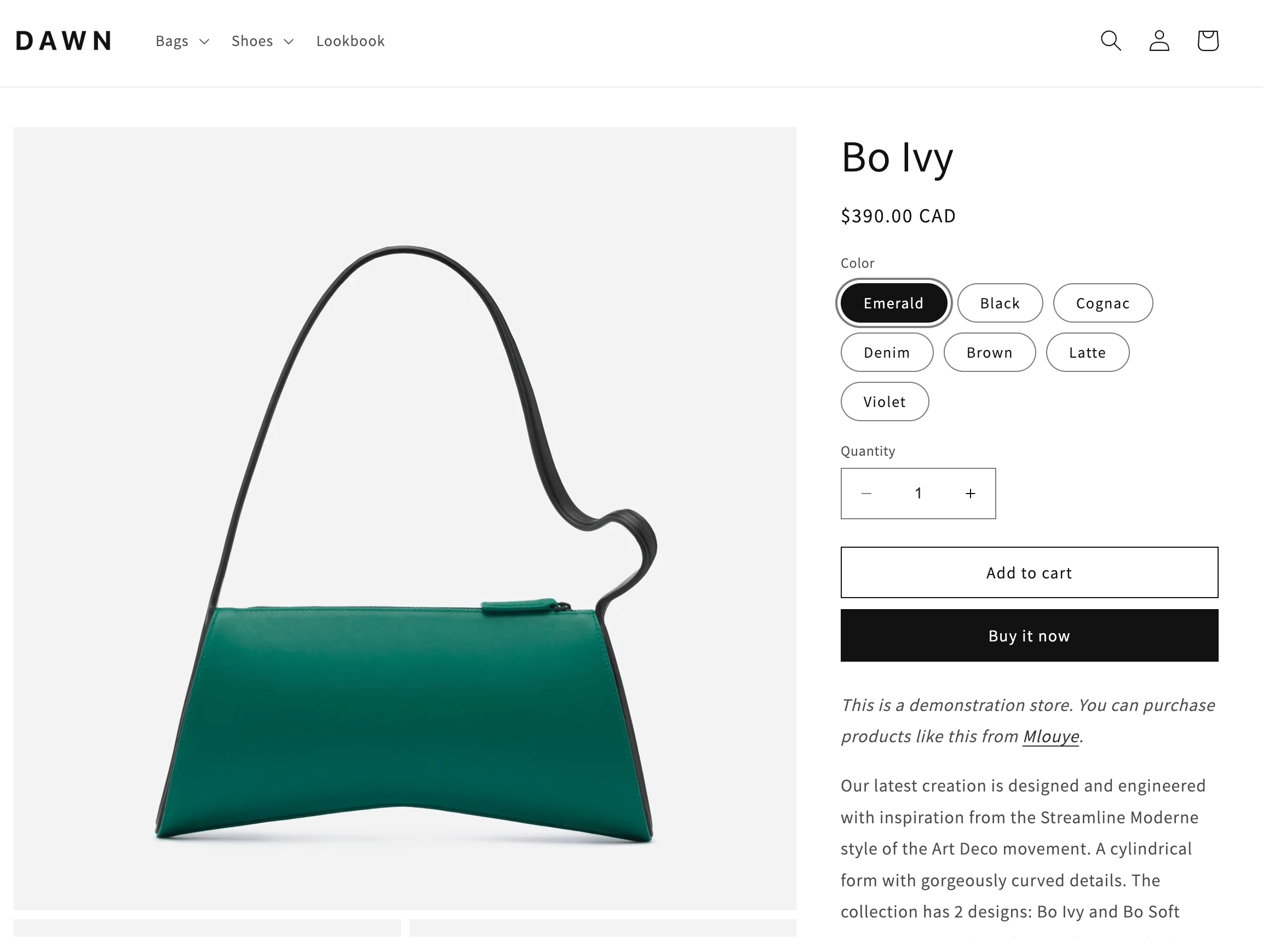
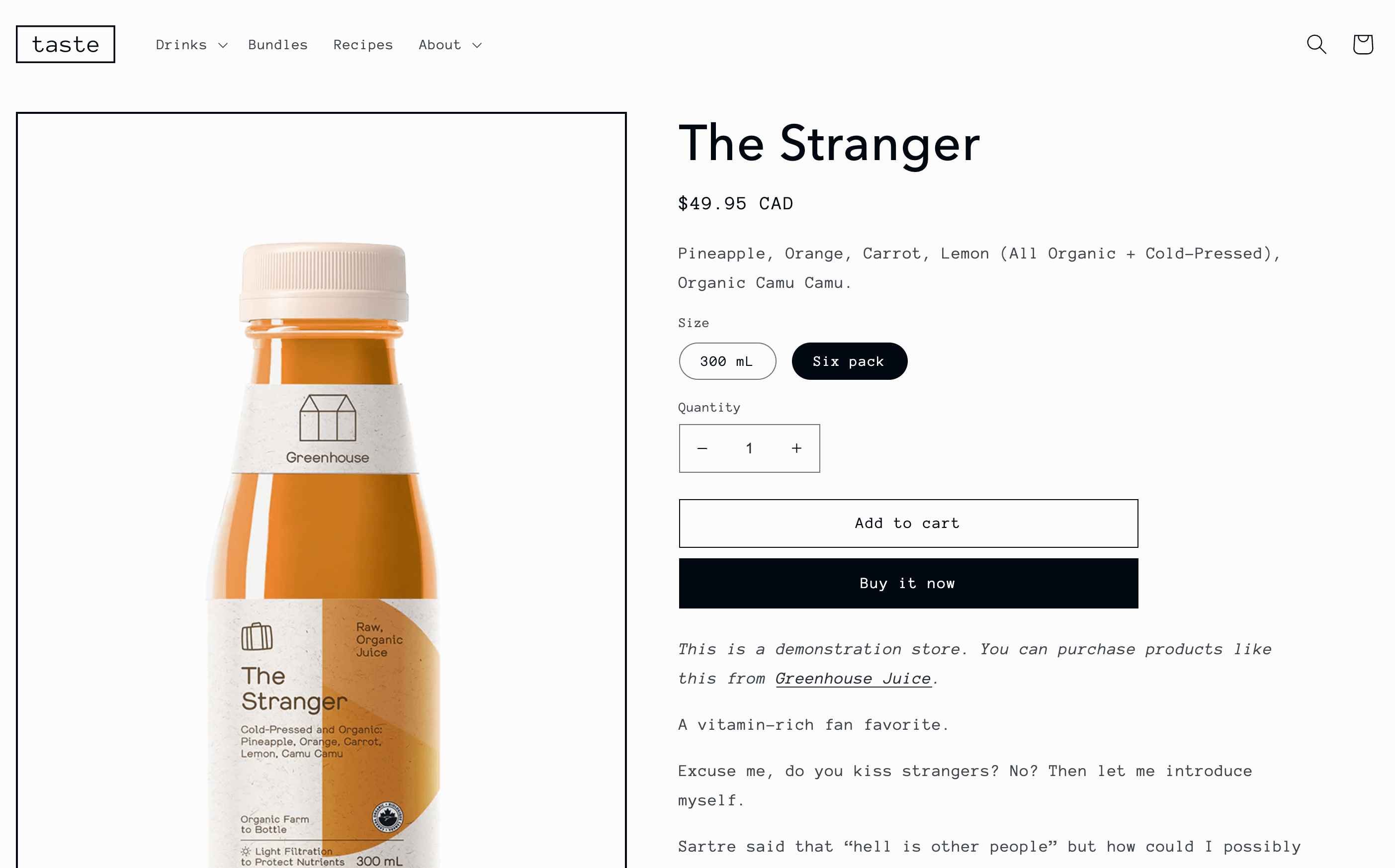
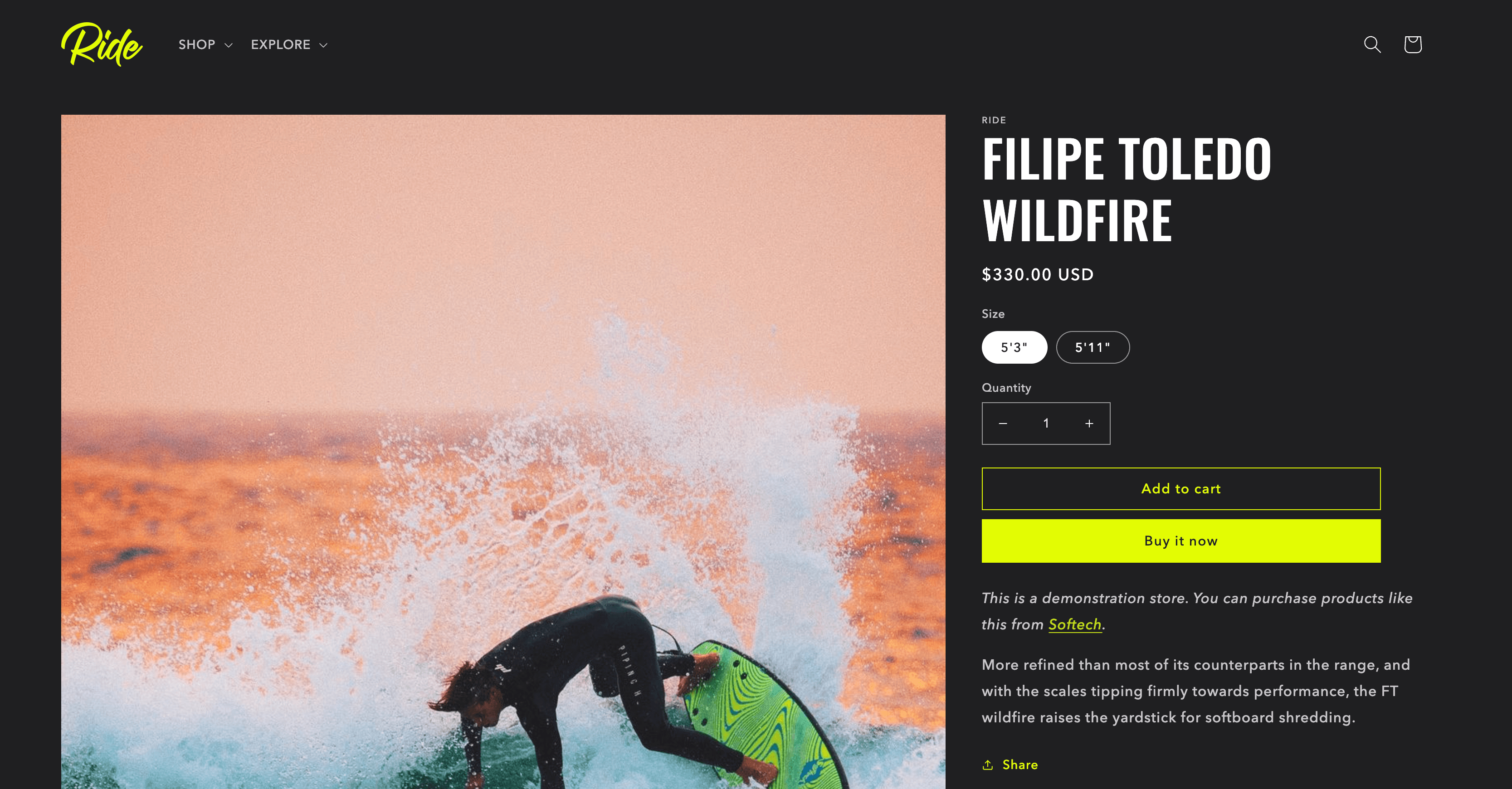
When designing your Shopify pages, it’s important to use attractive themes, colors, images, and videos. Shopify themes can help create a cohesive brand look that attracts potential customers. Here are some popular Shopify themes and their product pages (or you can use a Shopify Theme Detector to chose the same theme your competitor is using):
Dawn is a free Shopify theme especially popular for clothing and accessory stores. Dawn is a great minimalist starter theme that focuses on images. If you use this theme, make sure you have stellar photos to showcase.
Taste is another popular free theme on Shopify. This design is often used for food and drink brands and specialty shops. Taste features understated, light background colors, bold headlines, and highlights specialty products.
Ride is a free Shopify theme that works well for sports stores. The layout includes a dark background and bold, bright typography.
Interface
Also, consider the interface of your Shopify product pages. When choosing a design, use a simple and intuitive layout. Your product pages should be easy to navigate and understand. An easy-to-use layout allows customers to quickly find the information they are seeking. Also, use clear and concise typography that is easy to read. Avoid using too much text on each page or text that's similar in color to the background, making it hard to read.
For advanced customization and enhanced flexibility, explore the headless Shopify approach that offers limitless possibilities for speed and responsiveness that set your business apart. When designing your Shopify pages, use colors and fonts consistent with your brand. This will help to create a cohesive and recognizable brand experience. Also, consider how you use white space. White space allows your visuals and text to stand out more. It is a valuable tool for creating a great interface experience.
Mobile Optimization
Mobile traffic makes up 79% of Shopify traffic. Optimizing your Shopify pages for mobile devices has never been more critical. If your product pages are not mobile-friendly, you’ll lose out on potential sales.
Here are some tips for optimizing your Shopify product pages for mobile devices:
Use a responsive design. A responsive design will automatically adjust the layout of your product pages to fit any screen size.
Use large buttons and text. Make sure your buttons and text are large enough to be easily tapped on mobile devices.
Use high-resolution images. Use high-resolution images that look good on any size screen.
Minimize the amount of text on each page. Mobile users have less screen real estate, so it is important to minimize the amount of text on each page.
Make it easy for customers to add products to their cart and checkout. Make sure your mobile checkout process is easy and straightforward to use.
However, optimizing for mobile websites might not always be enough if you want to truly increase customer experience. A dedicated mobile app can offer a more seamless, personalized shopping experience that drives loyalty and sales. With Shopify mobile app builder like Simicart, you can easily sync your store data and launch your own app, completely free.
A/B Testing
A/B testing is a valuable tool for Shopify merchants who want to improve their product pages and increase conversions. A/B testing - sometimes called split testing - offers two versions of a web page to potential customers and gauges how well each page performs. A/B testing allows you to monitor your conversion stats and see which Shopify page version performs best.
By testing different variations of your product pages, you can see what works best for your customers and make necessary adjustments. Some A/B testing software you can use to help improve your Shopify site include Intelligems A/B Testing, Google Optimize, and Optimizely.
Successful Shopify Examples
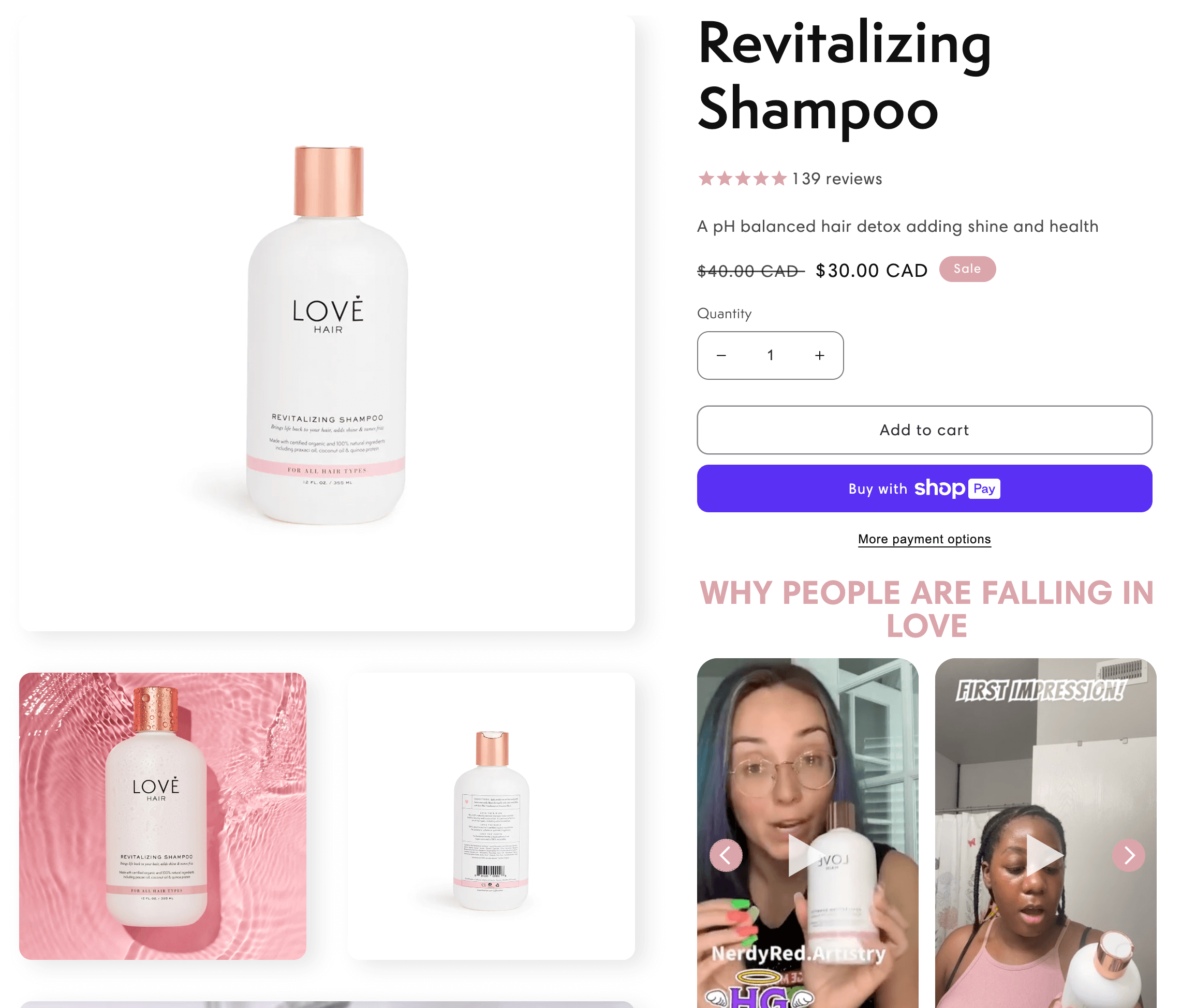
Love Hair is one example of a merchant with beautiful Shopify product listings. The site uses a clean design and neutral colors to reflect the clean products it sells. Love Hair also leverages video content to engage potential buyers.
Gymshark is another successful Shopify seller. Gymshark is one of the most well-known brands in gym apparel. The company uses clean and engaging product pages to drive traffic and sales of its fitness products. Gymshark gets over 4 million visitors per month to their site, demonstrating that their web optimization is paying off big-time.
Kickflip for Shopify
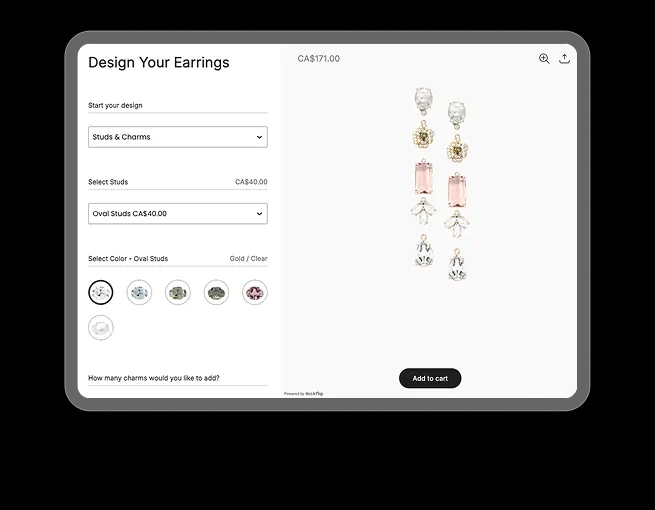
Do you want to take things further... take things up a notch? Kickflip can supercharge your Shopify store by empowering you to offer unlimited customization options. If you want to offer product options, customization, or personalization, Kickflip is an app that is a game changer for Shopify. Kickflip allows you to offer infinite customization options, variants, and dynamic pricing that updates as customers choose their options. You can even allow your customers to upload their own images on your products, or type text.
Kickflip seamlessly integrates with Shopify so you can unlock unlimited customization options for your products. Whether you want to allow personalized names, logos, or a wide range of customized color combinations, Kickflip gives you the freedom and flexibility to completely customize your Shopify store. It can even help you manage your inventory for custom products!
Olive and piper is an innovative Vancouver-based and woman-founded jewelry retailer that uses Kickflip to offer personalized necklaces, earrings, and bracelets. The boutique jeweler includes high-resolution, colorful images and modern design to showcase their stylish, contemporary products.
Elevate Your Shopify Product Pages
Shopify offers a global platform to get your products in front of millions of people around the world. Learning to optimize your Shopify product pages will land you more sales conversions and revenue. You can prepare your Shopify product pages for success by focusing on your design, keywords, descriptions, visuals, and interface.
If you offer customized products, check out Kickflip for the best solution to enhance your Shopify products. You can offer unlimited personalization options and allow customers to upload their own images with Kickflip. Book a free demo with Kickflip to get started today and watch your business boom!
Future reading
Share This article

Written by Renaud Teasdale
October 4th, 2023
Renaud Teasdale is co-founder and CEO of Kickflip, which he launched in 2010. Prior to starting Kickflip, he worked as a designer at New Balance, bringing a strong focus on user experience to everything he builds.


Maarten Luyckx
Osaka World
The user-friendly interface of Kickflip, combined with excellent customer service, ensured that this project was brought to a successful and beautiful conclusion.
Shopify App Store
May 20, 2021

Marie-Laetitia Rossazza
My Dust Bag
It took me a long time to find the perfect customizer app, and I’m so happy to say that I finally did! Kickflip is truly the best app on the market. The front end and back end are excellent, and the team behind it is incredibly kind and helpful!
Shopify App Store
September 1, 2023

Brad Jurga
All-Star Sporting Goods
Kickflip made everything easy, from designing the builder all the way through launch. We’re designing truly custom equipment for elite baseball players and this platform allows us to have better engagement and excitement around our brand. We’re seeing an instant return.
Shopify App Store
June 16, 2025

Kasper Taylor
CodedInk
My experience with both the product and the support team has been fantastic. The user interface and user experience are excellent. The features are powerful, and the WooCommerce integration is seamless and easy to set up.
G2.com
June 16, 2025

Saber Naceur
Vinylacy
By far, and I truly mean it, the best customizer available on Shopify. It’s easy to understand and manage, offers options for all types of products, and works extremely well. On top of that, it looks beautiful and feels premium. Highly recommended.
Shopify App Store
December 17, 2022

Jesus Guillermo de León Pérez
Dismo
Kickflip is a fantastic tool. It’s super intuitive, easy to use, and packed with capabilities. You don’t have to be an expert or have experience with other products to get started. The support team is also great and very responsive.
Shopify App Store
July 10, 2024

Frieder Urban
Era of Arc
We were looking for an uncomplicated configurator that was quick and easy to set up, offered plenty of design options, and worked reliably with fast loading times. We tested many configurators on the market, and with Kickflip, we found exactly what we needed.
Shopify App Store
October 10, 2024

John Taggart
Jack Harry and Ollie
What a great addition to our business Kickflip has been. It’s been fantastic to offer our customers the ability to personalize their orders. The support has been excellent, and we especially love that the pricing is tied to our success as customers make purchases.
Shopify App Store
May 7, 2021

TJ Garske
The Net Return
Kickflip saves our team a ton of time by eliminating the need to create custom mockups for customers. Customers can build their product themselves and place an order instantly, without any back-and-forth.
G2.com
January 26, 2026

Amin Hasani
CURVD
After extensive research into product customizer tools, we chose Kickflip for many reasons. We don’t like complicating simple tasks for customers, and Kickflip helped us simplify the process and create a seamless customer experience.
Shopify App Store
July 29, 2025