What are product attributes?
Written by The Kickflip Team
February 25th, 2026
Table Of Contents
Product attributes sound like harmless little labels. Size. Color. Material. They sit quietly in your backend, organizing your catalog and helping customers filter through your product pages.
Until you try to launch a customizable product.
Suddenly, those simple labels collide with the reality of variants, SKUs, and combinations that multiply faster than you can manage.
In this guide, we'll break down what product attributes actually are and how they work in modern ecommerce.
What are product attributes?
A product attribute is any characteristic that defines or describes a product. These are the details that help customers understand what they're buying and help your systems organize, filter, and display your catalog.
At the most basic level, attributes answer the questions customers ask before they buy:
What color is it?
What size does it come in?
What material is it made from?
Product attributes generally fall into three categories:
Descriptive attributes answer basic customer questions: color, size, material, weight, and physical dimensions. For example, a t-shirt might include color, size, and fabric attributes.
Functional attributes define components, compatible accessories, and add-ons. For example, a laptop might have attributes like RAM, storage capacity, and processor type.
Personalization attributes capture customer inputs rather than predefined options. These include text fields for custom engravings, image uploads for logos, font selections, and placement choices.
What are the types of product attributes?
When you start building configurators or managing complex product catalogs, you’ll use six product attributes:
1. Descriptive attributes
These are the core attributes most ecommerce platforms handle out of the box. They form the baseline of your product information. For example, they might include:
Color
Material
Size
Weight
Physical dimensions
 Example of a seat cover for a kid’s bike
eCommerce platforms like Shopify, WooCommerce, and Wix all let you create these attributes to populate product pages. But when it comes to customization, that’s where most platforms stop.
2. Visual attributes
Visual attributes control what customers see as they interact with your product. These go beyond static images to include layered product views, live coloring options, and angle switching that updates in real time.
When a customer selects "navy blue" and watches the product image change instantly, that's a visual attribute at work. We’ve seen our own customers use layered PNG images to render these changes in milliseconds.
 This bike's frame color changes from wood to black when you choose the “Recycled” option
3. Functional or component attributes
Functional attributes define the building blocks of multi-part products. If you sell items that your customers assemble from components, you're working with component attributes.
For example, a watch configurator might offer separate attributes for case material, dial color, strap type, and buckle finish. That’s why they matter for multi-component products because each selection affects what the final product includes.
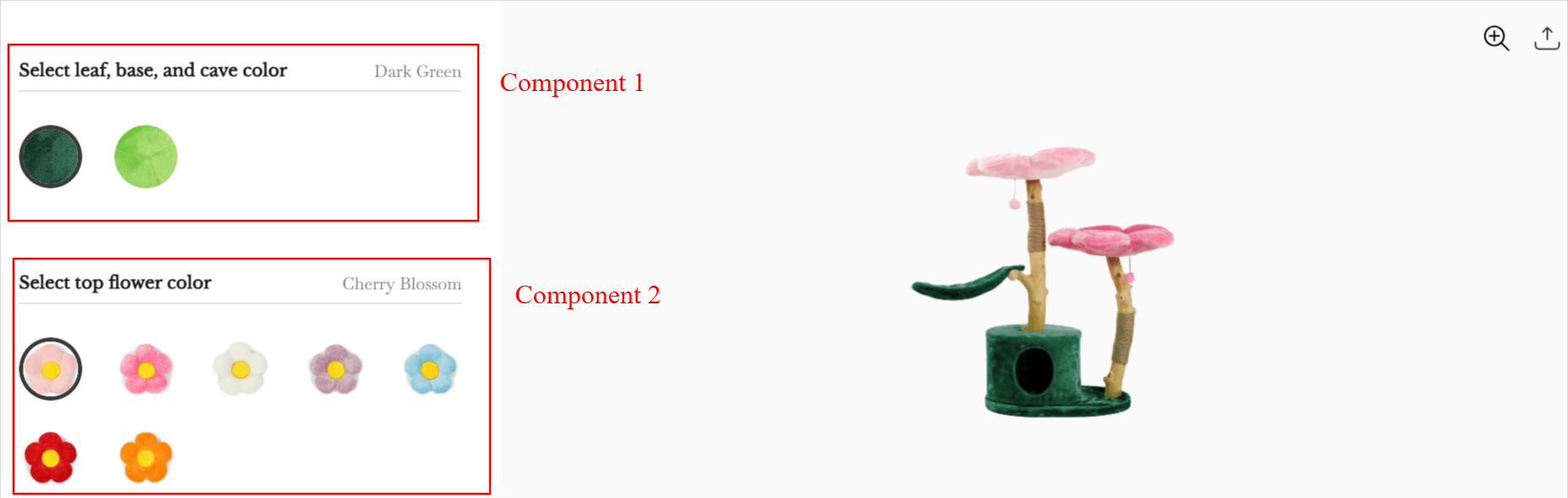
A cat tree with multiple customizable product attributes
4. Personalization attributes
Personalization attributes let customers add their own content to a product. This includes text fields and font options for monograms, names, or custom messages.
If you’re using the right product configurator, your customers can also upload images that they want printed or engraved. The thing is that you also need backend systems that can turn customer inputs into production-ready files.
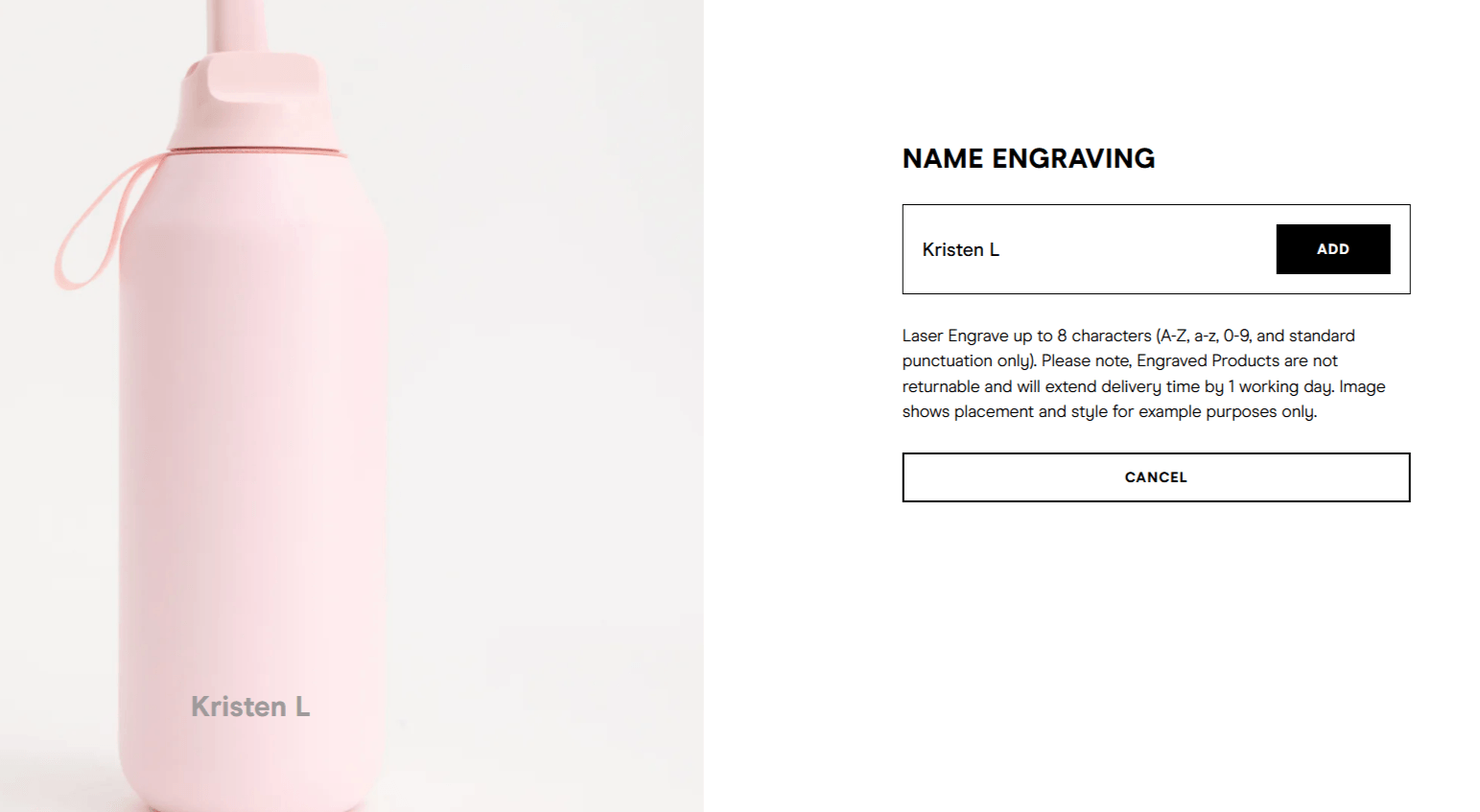
Example of a customized bottle with name engraving
5. Pricing attributes
Pricing attributes affect a product’s cost based on customer selections. Premium materials might add a percentage to the base price, while add-on components might carry flat fees.
Let’s say you’re selling a wallet with real leather versus faux leather. The real leather will obviously cost more, so you can let that component drive the product’s final price.
As customers configure their product, the price updates in real time so there are no surprises at checkout.
6. Logic-based attributes
Logic-based attributes control the relationships between options. They determine:
Which selections are compatible
Which options should appear based on previous choices
Which combinations are impossible
For example, if a gold watch case can only be paired with leather straps, logic rules hide the silicone strap options when a customer selects gold. This helps you reduce the likelihood of impossible pairings.
Why product attributes matter for ecommerce brands
Here are a few reasons why you need to make sure you have the right attributes in your store:
Structured attributes help with clearer merchandising
When your product attribute data is consistent and complete, your customers can filter by the characteristics that matter to them. They can compare similar items and find what they're looking for without clicking through dozens of pages. That alone has a measurable impact on your bottom line.
Better attribute structure leads to higher conversion rates
Customers buy with more confidence when they understand exactly what they're getting.
Think about your own shopping behavior for a second. You're far more likely to complete a purchase when you can confirm the jacket is water-resistant or the material matches what you had in mind.
When you input the right attributes, your customers stop hesitating during checkout. This, in turn, leads to better conversion rates.
Detailed attributes reduce the possibility of returns
The flip side is equally important. Many ecommerce returns happen because the product didn't match what customers expected. A 2024 study found that young consumers between the ages of 18 and 40 tend to return products because of buyer’s regret, amongst other reasons.
When your attributes accurately represent what the product looks and feels like, you close that gap before the order even ships.
Attributes make customization scalable
Product attributes are the engine that powers modern product configuration.
When you connect attributes to a configurator, you control:
What customers see as they make selections
How the price updates based on their choices
Which options appear or disappear based on compatibility rules
What data flows to your fulfillment team when an order is placed
This is the shift from attributes as static data to attributes as interactive building blocks. And it's what allows you to offer deep customization without creating hundreds of individual SKUs for every possible combination.
How product attributes work inside a product configurator
In traditional ecommerce setups, attributes live in your backend and surface on product pages as drop-down menus or filter options. They describe the product, but they don't do much beyond that.
Inside a product configurator software, attributes take on an entirely different role. Here’s how:
1. Attributes control real-time visualization
When a customer selects a color, material, or component inside a configurator, the product image should update instantly. Visual attributes power this experience by connecting each option to layered product images.
Let’s say the customer selects "ocean blue" and the product renders in that color. Configurators like Kickflip render these visual updates in around 120 milliseconds, which means customers see changes faster than they can blink.
🔥 Pro tip: Use visual cues wherever possible. Attributes like thumbnails, color chips, and multi-view images help customers make decisions faster than text labels alone.
2. Attributes trigger pricing changes
If you have a custom product, you’re probably not offering flat pricing. Maybe an engraved message adds a fee or a specific component costs less.
In these cases, as customers build their custom product, the price updates dynamically so they always know exactly what they're paying. Depending on your business needs, you can set up:
Percentage increases for premium materials
Flat fees for add-ons or personalization
Tiered discounts based on quantity
Multi-currency support for international customers
🔥 Pro tip: Tie every pricing attribute to a visible update. When customers see the total change as they add options, they understand the value of each selection.
3. Attributes power logic rules
Every combination you create or mix and match with your configurator won’t make sense. For instance, a gold watch case might only work with certain strap colors. This is where logic rules come into the picture.
Logic-based attributes let you define these relationships so the configurator handles them automatically.
When a customer chooses a non-compatible option, they won’t be able to check out or even add the product to the cart. This keeps the experience clean and prevents invalid orders from reaching your production team.
🔥 Pro tip: Use logic rules to reduce the burden of making a decision. If a customer selects "express shipping," for example, you could automatically hide options that can't be fulfilled in that timeframe.
4. Attributes define components in multi-part products
In some cases, products aren’t single items. They’re collections of components that customers assemble into a finished whole.
Component attributes make these configurations possible by treating each part as its own customizable element.
Consider how this works across different product types:
A custom shoe might include separate attributes for the sole, upper, laces, and insole.
Sporting equipment might let customers choose their grip, blade, and accessories independently.
Modular furniture might offer selections for fabric, frame material, legs, and hardware.
Customers build their product piece by piece, and each selection feeds into the final order. You don’t have to create individual SKUs, and your customers get a customized product.
🔥 Pro tip: It’s best to group your component attributes in a logical sequence that mirrors how customers think about the product. For a shoe, that might mean starting with style, then moving to material, color, and finally personalization.
5. Attributes drive backend operations
The customer-facing configurator is only half of the equation. Once someone places an order, your team needs clean data to produce and ship the product.
When you define your attributes properly in the backend, that’ll feed directly into your backend operations by:
Generating print-ready files that capture exactly what the customer designed
Mapping your inventory so you know which components are being consumed
Structuring your order details so your fulfillment team sees every specification
🔥 Pro tip: Keep your attribute naming conventions simple and consistent across products. When your fulfillment team sees "Navy Blue" on one order and "Dark Blue (Navy)" on another, you end up having duplicate attributes across the board.
What are the use cases for attribute-driven customization?
Here are a few scenarios where attribute-driven configuration changes what brands can offer their customers:
Electronics
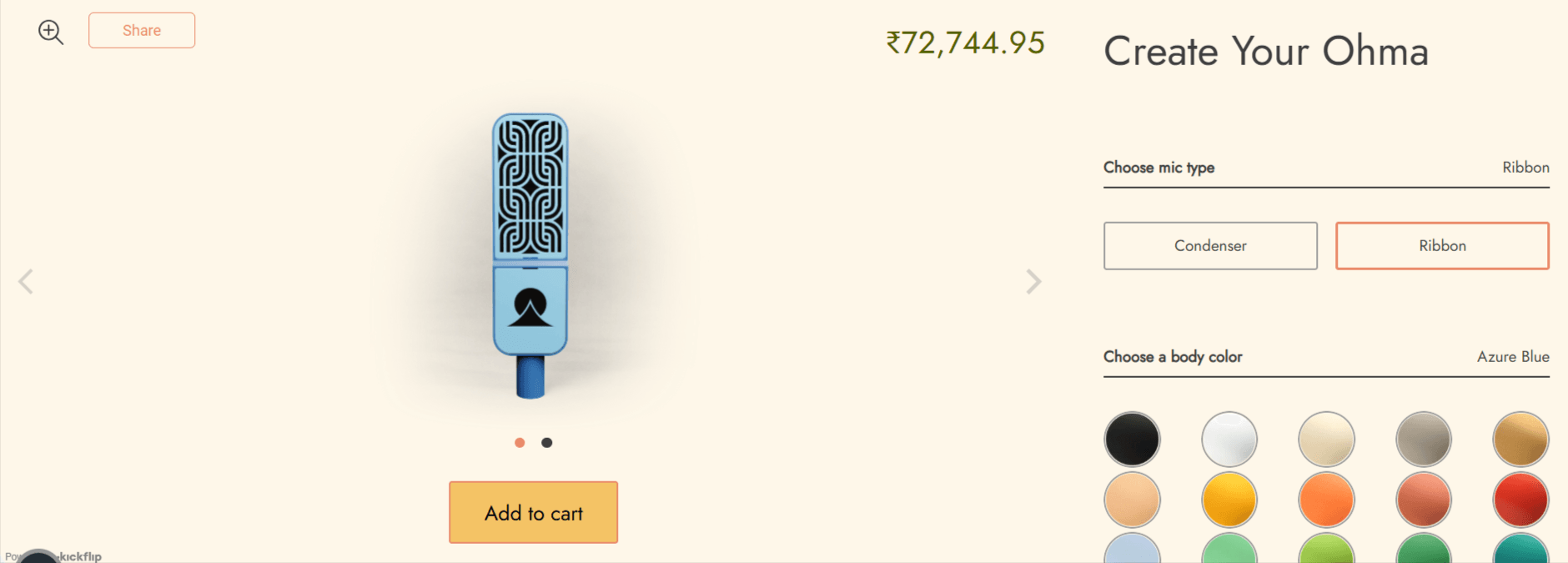
Consumer electronics brands often sell products with interchangeable components. In the example below, you can see how OHMA’s microphone builder uses different components (or attributes) like color and mic type to build a new product.
Furniture and goods
Furniture products are one of the most personal and long-term investments your customers make. So, it makes complete sense to customize every nook and cranny before committing to the right product.
Here’s an example from Era of Arc, a kitchen goods company, of how attributes come into play:
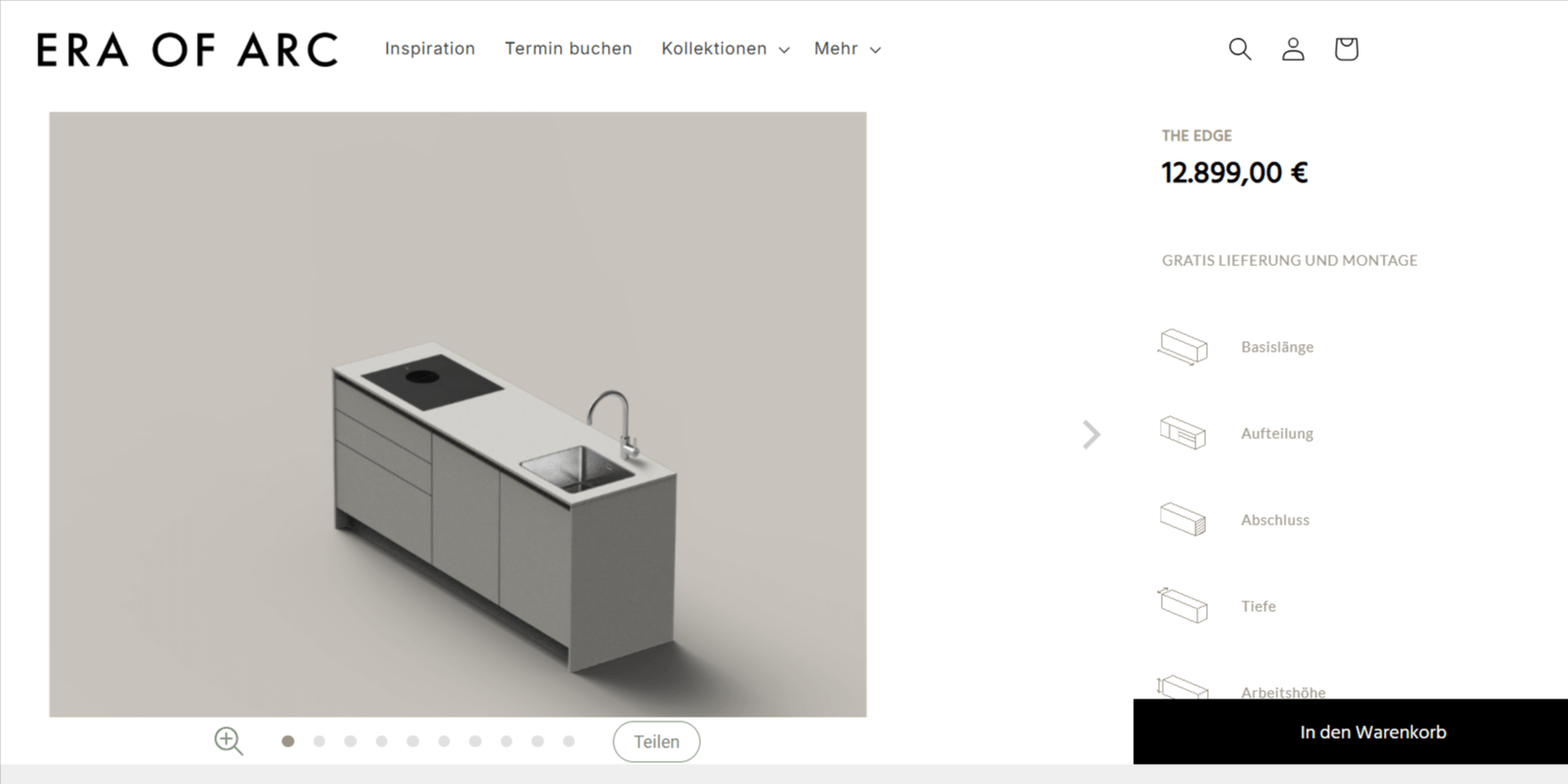
Customize everything from your countertop to your base and taps
Build-your-own bundles or kits
Some products aren't standalone items but curated collections that customers assemble themselves. In these cases, bundle attributes:
Define what's included in each kit
Apply volume pricing
Ensure availability
Here’s an example from Branch, a home and office goods company:
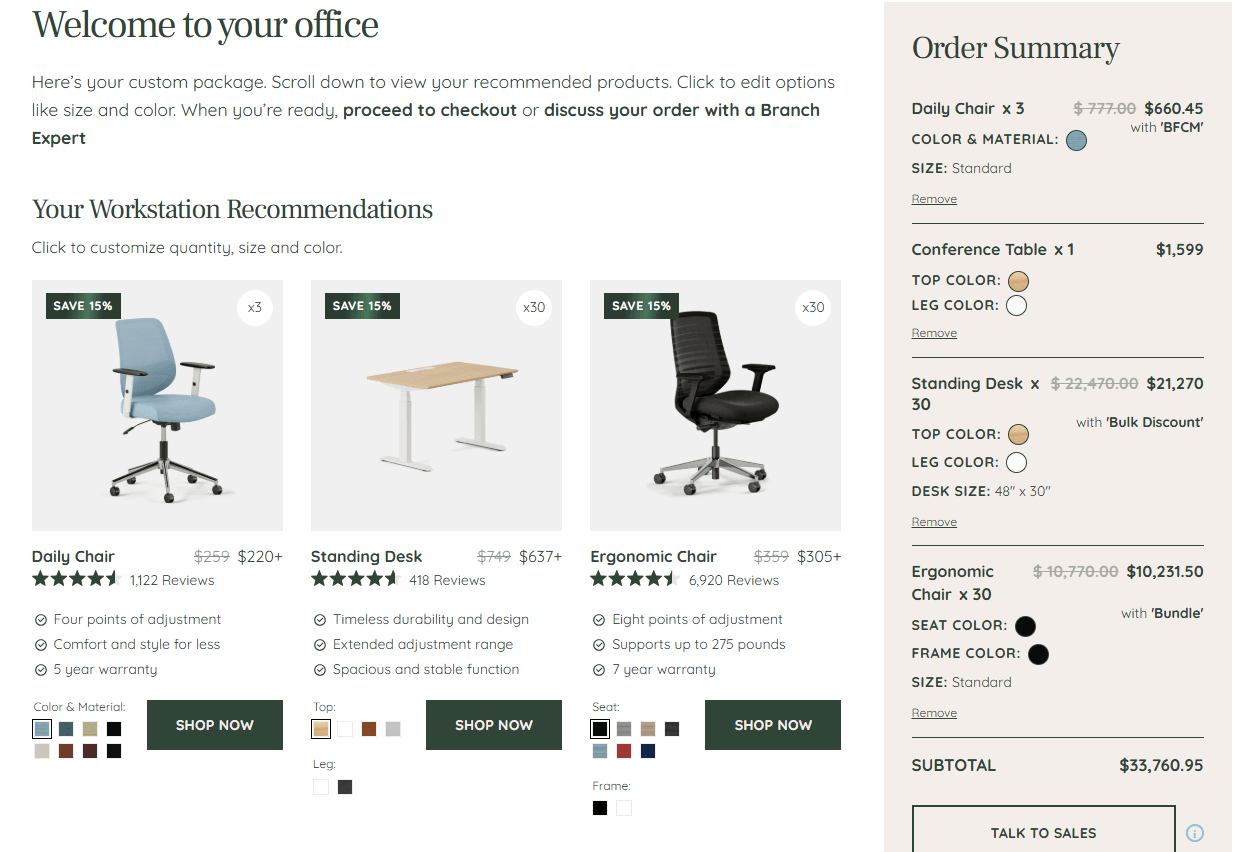
Product attributes are the key to scalable product customization
Most ecommerce brands don't think much about their attribute structure until something breaks. Maybe they hit Shopify's variant limit or their SKU count spirals out of control.
These problems share a common root: attributes that were set up for basic catalog management, not for the kind of customization modern customers want.
That said, you don’t have to build everything from scratch. All you need to do is understand how attributes work and its domino effect on your entire operations.
If you’d like to know how attributes work for customization, why not attend one of our free webinars? We walk you through the entire process to show you how attributes are the backbone of your revenue operations.
Share This article

Written by The Kickflip Team
February 25th, 2026
The Kickflip team is made up of ecommerce specialists, product experts, and engineers behind Kickflip, a product configurator platform for Shopify, WooCommerce, and Wix. Since 2010, we’ve helped thousands of brands scale personalized product experiences, from startups to Fortune 500 companies. On our blog, we share practical insights to help you improve the buying experience and grow your business with product customization.


Maarten Luyckx
Osaka World
The user-friendly interface of Kickflip, combined with excellent customer service, ensured that this project was brought to a successful and beautiful conclusion.
Shopify App Store
May 20, 2021

Marie-Laetitia Rossazza
My Dust Bag
It took me a long time to find the perfect customizer app, and I’m so happy to say that I finally did! Kickflip is truly the best app on the market. The front end and back end are excellent, and the team behind it is incredibly kind and helpful!
Shopify App Store
September 1, 2023

Brad Jurga
All-Star Sporting Goods
Kickflip made everything easy, from designing the builder all the way through launch. We’re designing truly custom equipment for elite baseball players and this platform allows us to have better engagement and excitement around our brand. We’re seeing an instant return.
Shopify App Store
June 16, 2025

Kasper Taylor
CodedInk
My experience with both the product and the support team has been fantastic. The user interface and user experience are excellent. The features are powerful, and the WooCommerce integration is seamless and easy to set up.
G2.com
June 16, 2025

Saber Naceur
Vinylacy
By far, and I truly mean it, the best customizer available on Shopify. It’s easy to understand and manage, offers options for all types of products, and works extremely well. On top of that, it looks beautiful and feels premium. Highly recommended.
Shopify App Store
December 17, 2022

Jesus Guillermo de León Pérez
Dismo
Kickflip is a fantastic tool. It’s super intuitive, easy to use, and packed with capabilities. You don’t have to be an expert or have experience with other products to get started. The support team is also great and very responsive.
Shopify App Store
July 10, 2024

Frieder Urban
Era of Arc
We were looking for an uncomplicated configurator that was quick and easy to set up, offered plenty of design options, and worked reliably with fast loading times. We tested many configurators on the market, and with Kickflip, we found exactly what we needed.
Shopify App Store
October 10, 2024

John Taggart
Jack Harry and Ollie
What a great addition to our business Kickflip has been. It’s been fantastic to offer our customers the ability to personalize their orders. The support has been excellent, and we especially love that the pricing is tied to our success as customers make purchases.
Shopify App Store
May 7, 2021

TJ Garske
The Net Return
Kickflip saves our team a ton of time by eliminating the need to create custom mockups for customers. Customers can build their product themselves and place an order instantly, without any back-and-forth.
G2.com
January 26, 2026

Amin Hasani
CURVD
After extensive research into product customizer tools, we chose Kickflip for many reasons. We don’t like complicating simple tasks for customers, and Kickflip helped us simplify the process and create a seamless customer experience.
Shopify App Store
July 29, 2025